

Choose the official EOS agenda when fidelity to its published seven-section, 90-minute format matters. Choose the ClickUp Level 10 Meeting Doc when your team already works in ClickUp. Choose a spreadsheet when the team is willing to maintain shared rows and history. Choose a PDF or image only when a visual agenda is enough.
The more important question is what must happen after the meeting. If next week’s facilitator needs to find open actions, owners, metric readings, decisions, and unresolved issues, a poster is not the working record you need. The resources below also have different access requirements, so check each current landing page before adopting one.
This guide compares the verified formats and then proposes a practical record and review process. The workflow is intentionally platform-neutral: it helps you decide what the template must support without implying that any listed template includes unverified automations or integrations.
The right Level 10 template depends on what must happen after the meeting
An agenda tells the team what to discuss. A working record also makes next week’s owners, actions, and metric periods retrievable. If follow-up must be searchable and assigned, choose an editable record and decide where the authoritative action-item record will live.
A Level 10 Meeting, or L10, is an EOS weekly leadership meeting organized around seven agenda sections. EOS describes its official agenda as a 90-minute meeting. Teams can adapt their meeting practices, but using an L10 template by itself does not mean adopting the complete EOS system.
What a Level 10 agenda needs to preserve
The official EOS agenda has seven sections: Segue, Scorecard, Rock Review, Customer/Employee Headlines, To-Do List, IDS, and Conclude. EOS allocates five minutes to each section except IDS, which receives 60 minutes, for 90 minutes total. Treat those as EOS agenda allocations, not an inflexible rule for every adaptation. EOS’s official agenda page lists the sections, addresses virtual and hybrid meetings, and requires form completion to access the download.
Keep the records distinct. A Scorecard holds recurring measures for a defined reporting period. Rocks are quarterly priorities with owners. Issues are items to identify, discuss, and solve. To-Dos are specific follow-up actions. Conclude includes To-Do recaps, cascading messages, and a meeting rating. EOS guidance identifies 8 as the minimum standard for that rating. That is EOS operating guidance, not a scientifically validated effectiveness threshold. EOS’s meeting explanation provides additional agenda and Scorecard guidance.
Before choosing a resource, check that all seven sections are represented, the intended time allocation is visible, and the close captures follow-up and a rating. A team can change the agenda, but it should make those changes deliberately rather than accidentally blending measures, issues, and actions into one notes field.
Compare the verified Level 10 template options by format and access
The descriptions below are limited to what the current provider pages or assets support. Third-party resources are provider offerings, not EOS-endorsed templates. Recheck format and access conditions immediately before adoption because pages and gated assets can change.
| Resource | Verified format | Access friction | Best fit |
|---|---|---|---|
| EOS Worldwide agenda | Official agenda download | Form required | Teams prioritizing the published EOS structure |
| ClickUp Level 10 Meeting | Ready-to-use ClickUp Doc | ClickUp Workspace access | Teams already keeping meeting work in ClickUp |
| ClickUp Leadership Meeting Agenda | ClickUp leadership agenda | ClickUp Workspace access | Teams wanting a general leadership agenda rather than a verified strict EOS sequence |
| Integrator Impact | Leadership Meeting Agenda download; file contents not exposed | Lead form required | Teams willing to inspect a gated provider download first |
| Elefante RevOps | Excel-format L10 resource | Gated access; confirm current requirements | Teams that prefer a weekly spreadsheet agenda |
| Strety | Two-page PDF agenda | Landing page advertises the PDF | Teams wanting a printable agenda reference |
| Fireflies | Static PNG visual reference | Direct image | Screen sharing or printing the sequence, not capturing ongoing work |
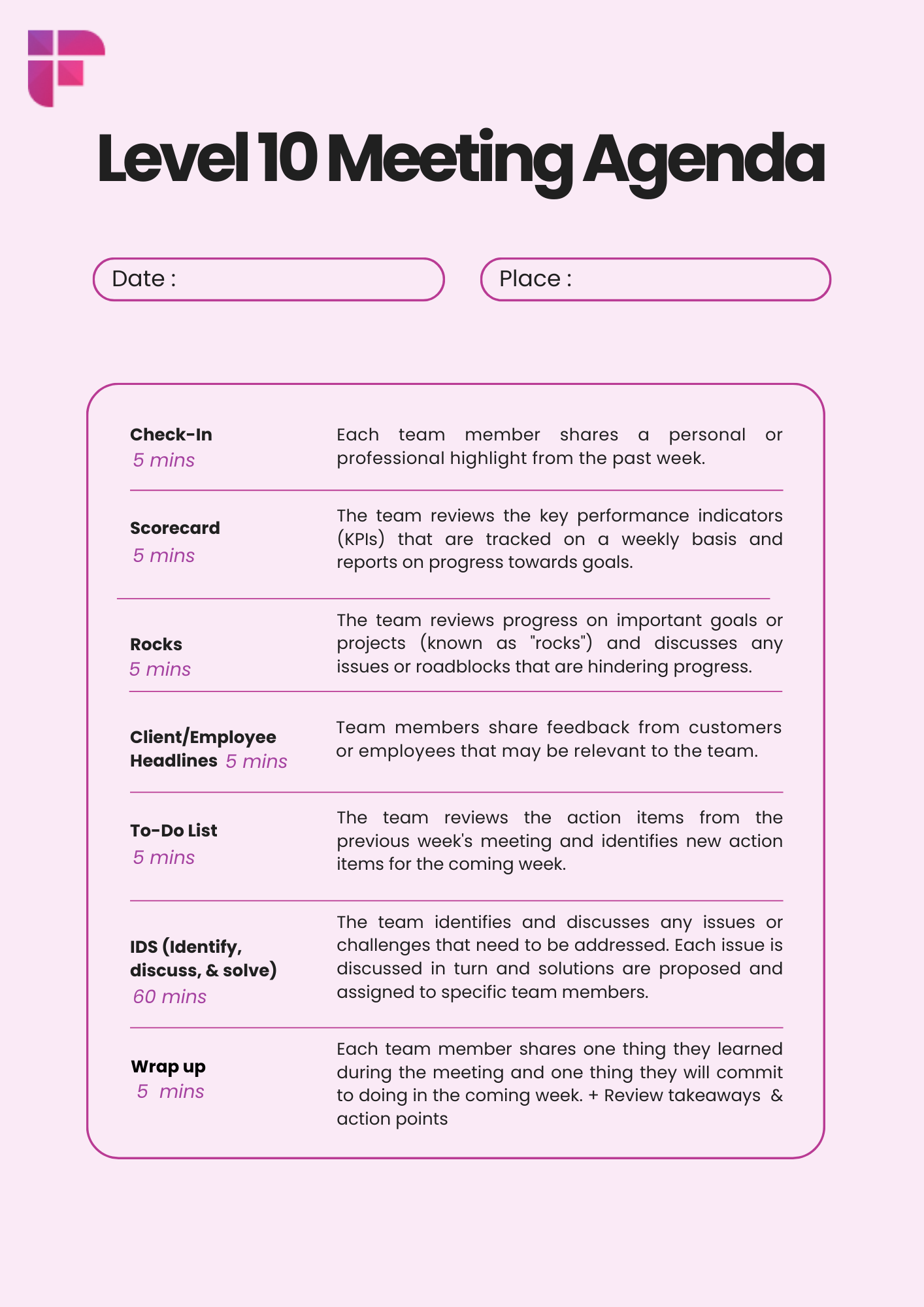
The ClickUp Level 10 resource is described as a ready-to-use Doc. Its landing page does not establish that Custom Fields, reminders, or task creation are preconfigured in the template. ClickUp documents recurring tasks, reminders, and Custom Fields as separate platform capabilities, so verify and configure them separately if they belong in your process. The general ClickUp Leadership Meeting Agenda supports a broader leadership meeting, but its page does not establish the strict seven-section EOS structure.
Integrator Impact’s page does not expose the actual file contents. Elefante’s page confirms an Excel resource without verifying every column. Strety’s page confirms a two-page PDF, not a companion spreadsheet. Fireflies provides a static image, not a fillable working record. In this comparison, free does not necessarily mean direct, editable, or account-free.
Choose based on the team’s operating model
Use a static image or printable agenda when the job is simply to keep the sequence visible. Use an editable document when participants need to capture discussion in one shared place. Use a spreadsheet when the team is comfortable maintaining rows and history manually. Use a task-connected process when actions must be owned and tracked in the team’s task system.
That last option is a workflow decision, not a feature to infer from a template’s name. Decide where the authoritative action-item record lives before the first meeting. A facilitator might capture an agreed To-Do in the meeting document, then create or update the actual task in the team’s chosen task system. The meeting record should retain the task identifier or a clear reference so next week’s review can distinguish open, completed, and newly agreed actions. If ClickUp is being considered as the working record, ClickUp consulting can help assess fit with the existing workflow.
Set a minimum record contract before the first meeting
The following is a proposed record design, not an official EOS, ClickUp, or provider schema. Define one meeting occurrence as one scheduled instance, not merely a calendar date. A metric observation is one metric’s value for one reporting period in that occurrence. An action item is one agreed task. An individual rating belongs to one participant and one occurrence; it is not the same record as a meeting-level summary.
- Meeting occurrence: stable occurrence ID, scheduled timestamp, timezone, facilitator, and participants.
- Metric observation: metric ID, owner, value, status, reporting-period start and end, source, and capture timestamp.
- Rock and issue: stable item ID, owner where applicable, status, and relevant meeting reference.
- To-Do: action ID, clear title, exactly one accountable owner, due date, status, and source note.
- Rating: participant ID, rating, and optional comment, with any meeting-level summary stored separately.
For example, a metric observation can use meeting_occurrence_id + metric_id + observation_run_id. A participant rating can use meeting_occurrence_id + participant_id + rating_submission_id. If only one rating per participant is permitted, the submission ID can be replaced by a uniqueness rule on the first two fields. Do not use the meeting date alone when two meetings can occur on the same day.
{
  "meeting": {
    "meeting_occurrence_id": "ws_42|2026-11-05T16:00:00Z|leadership_l10",
    "scheduled_start_utc": "2026-11-05T16:00:00Z",
    "timezone": "America/Los_Angeles",
    "facilitator_id": "user_17"
  },
  "metric_observations": [
    {
      "metric_id": "renewal_rate",
      "observation_run_id": "run_2026w44_renewal",
      "period_start": "2026-10-26",
      "period_end": "2026-11-01",
      "value": 0.91,
      "owner_id": "user_23"
    }
  ],
  "action_items": [
    {
      "action_id": "todo_104",
      "title": "Review the renewal forecast",
      "owner_id": "user_23",
      "due_date": "2026-11-06",
      "status": "open"
    }
  ]
}
All values and identifiers above are illustrative. If an occurrence is rescheduled, retain its stored ID and update the schedule rather than silently treating the new timestamp as a second meeting. Where concurrent processing could create duplicates, enforce a unique key in the system of record or use an atomic transactional upsert. A lookup followed by a separate create is not sufficient when two processes can run together.
Run the weekly process with clear human ownership
A workable sequence needs no AI. Rules can check whether owners and dates are present, whether metric periods are defined, and whether IDs are duplicated. AI may help draft a recap or suggest whether an approved note is a headline, issue, decision, or candidate To-Do. It should not silently assign accountability or write an ambiguous action into the task system.
A small AI output contract can make review easier without making the output authoritative:
{
  "type": "candidate_todo",
  "title": "Review the renewal forecast",
  "owner_id": null,
  "due_date": "2026-11-06",
  "source_note_id": "note_883",
  "review_status": "needs_human_approval"
}
A null owner means the output is not ready to become a task. The facilitator must confirm the owner, date, wording, source meeting occurrence, and whether the task already exists. If ClickUp is used, its documentation covers recurring tasks, reminders, and Custom Field value formats as distinct capabilities. It does not establish that the L10 Doc configures them automatically. Teams that have defined their process and want help configuring it can explore ClickUp setup and automation.
Keep the template useful without making it more complicated
Review the record monthly. Check whether the Scorecard measures still inform decisions, each Rock has a clear owner, issues remain visible, and To-Dos have accountable owners and dates. EOS describes roughly 5 to 15 useful weekly measures as Scorecard guidance, not a quota. Give each metric a defined reporting period so the team does not compare a weekly total with a point-in-time value.
Set an explicit team rule for issues that remain unresolved, such as how they stay visible or move into a longer-term tracker. Do not assume that a particular aging threshold is a universal EOS requirement. If actions routinely lack owners, or the record is difficult to scan, repair or simplify the process before adding automation.
- Can participants find last week’s decisions and the source note behind them?
- Can they distinguish completed actions from open and overdue To-Dos?
- Does every current To-Do have one named owner and a due date?
- Can the record distinguish two meetings on the same date and preserve each metric’s reporting period?
Common questions about choosing a Level 10 meeting template
Can we run an L10 remotely?
Yes. EOS says its agenda can be used in virtual or hybrid meetings. Choose an editable shared record when participants need to update the same information. A static image can show the sequence, but it cannot capture each participant’s changes or preserve action history.
Can we use the agenda without adopting all of EOS?
Teams can adapt meeting practices, but an agenda template alone is not the complete EOS system. Be clear internally about which parts of the meeting process you are adopting and where decisions and actions will be recorded.
How is an L10 different from a daily standup?
An L10 follows a recurring, structured leadership agenda that includes Scorecard review, Rocks, and IDS issue-solving. A daily standup is a different meeting format and does not use this seven-section agenda by definition.
Is the EOS download account-free, and are other options editable?
The official EOS agenda download is form-gated. The ClickUp templates require Workspace access. Integrator Impact’s download is form-gated, and Elefante’s resource is also access-gated. Strety advertises a two-page PDF, while the Fireflies PNG is a static image. Check current provider requirements before choosing, and do not assume a PDF or image is editable.
Should every L10 have a fixed team size?
The reviewed EOS guidance does not establish a universal attendance range for every L10. Invite people whose leadership accountability and participation are useful to the meeting. EOS describes departmental adaptations, which may be shorter. Set attendance and cadence to fit the team’s operating responsibilities.