


AI Workflows Need Business Context Before Better Prompts

A lot of AI implementation advice still starts in the wrong place.
It starts with prompts, tools, models, and clever use cases. Those things matter, but they are rarely the reason an AI workflow succeeds or fails inside a real business.
The more practical starting point is context.
Not generic market context. Not a long brand document nobody reads. The actual operating context of your business: how leads move, where customers get stuck, what your team checks manually, which CRM fields are trusted, what makes a handoff good, and where decisions slow down.
Without that context, AI usually produces something polished but average. With that context, it can start removing real work.
The AI sameness problem is a workflow problem
When every team uses similar tools with similar prompts, outputs begin to sound and behave alike. This is obvious in content, but it also happens in operations.
A generic AI sales follow-up sounds like every other sales follow-up. A generic CRM cleanup suggestion misses the messy rules your team actually uses. A generic project plan creates tasks, but not the right ownership, dependencies, or review points.
The issue is not that AI is useless. The issue is that the workflow is under-specified.
If the system does not know what your business considers qualified, urgent, risky, complete, or ready for handoff, it will guess. Sometimes the guess looks confident enough to pass a quick glance. That is where mistakes enter the process.
Start with the material only your team has
The strongest AI workflows usually begin with internal material that competitors cannot copy. This could be:
- Sales call notes and objections
- Support tickets and recurring complaints
- Proposal drafts and client requirements
- CRM records with known data quality issues
- ClickUp tasks that keep getting reopened
- Email threads where handoffs break down
- Meeting transcripts with decisions and action items
- Product pages, service pages, and internal positioning notes
This is where AI becomes more useful. It is no longer generating from the open internet. It is helping review, classify, compare, and prepare work using your operating reality.
For example, instead of asking AI to “write a better lead follow-up,” a stronger workflow might ask it to review the lead source, CRM stage, last call summary, objections raised, and promised next step, then draft a follow-up that matches the actual sales situation.
That is a different level of usefulness.
Use a context audit before automation
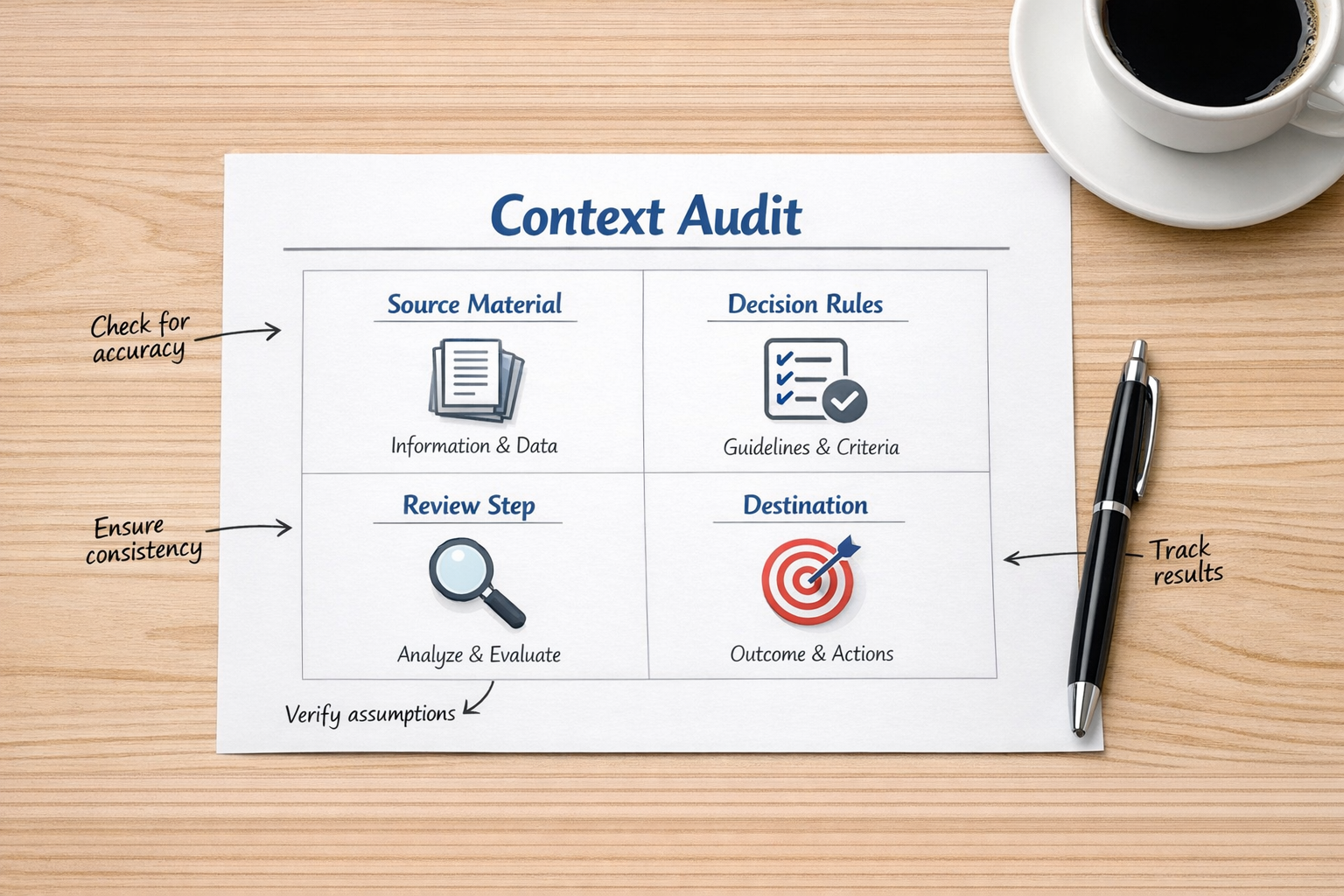
Before building an AI agent, Make scenario, Zapier workflow, ClickUp automation, or CRM process, run a simple context audit.
1. Source material
What should the workflow look at? This might be CRM fields, form submissions, support tickets, call transcripts, task comments, product data, or documents in a folder.
If the source material is incomplete or unreliable, the automation will inherit that weakness. This is why CRM cleanup and process validation often need to happen before the exciting AI layer.
2. Decision rules
What does the business already know that the AI needs to follow?
Examples include:
- What counts as a qualified lead
- Which support issues require escalation
- When a proposal needs founder review
- Which customers should not receive automated follow-up
- What makes a task ready for the next person
These rules do not need to be complicated. They need to be explicit.
3. Review point
Where should a human check the output?
Not every AI workflow should publish, send, update, or assign automatically. Many of the best early automations are assistive. They prepare the work, highlight the risk, draft the update, or suggest the next step. A person approves before the system acts.
This creates trust while the workflow is being validated.
4. Destination
Where should the output go?
An AI-generated insight is not very useful if it stays in a chat window. It should become a CRM note, a ClickUp task, a Slack alert, a draft email, a support tag, a proposal section, or a report.
The destination is what turns AI output into operational movement.
Good AI workflows remove copy-paste first
One of the easiest ways to find useful AI automation opportunities is to look for repeated copy-paste work.
For example:
- Copying form submissions into a CRM
- Turning call notes into follow-up emails
- Moving approved requests into ClickUp tasks
- Summarizing support issues for the product team
- Checking whether new leads match qualification rules
- Preparing weekly updates from scattered project comments
These tasks often have enough structure to automate, but enough judgment to benefit from AI support.
The goal is not to remove every human from the process. The goal is to remove the low-value handling around the human decision.
Validate before scaling

AI makes it tempting to build large workflows quickly. That can be risky if the process has not been tested.
A safer approach is to validate the workflow in a narrow area first.
Pick one specific process, such as inbound lead review, proposal follow-up, support escalation, content refresh, or CRM cleanup. Run the workflow on a small set of real examples. Compare the output against what a good operator would have done.
Ask:
- Did it use the right source material?
- Did it follow our decision rules?
- Did it flag uncertainty clearly?
- Did it save meaningful manual work?
- Did the output land in the right place?
If the answer is yes, expand the workflow. If the answer is no, fix the context before blaming the tool.
The tool comes after the process
Make, Zapier, ClickUp, HubSpot, GoHighLevel, Shopify, WordPress, and custom AI agents can all be powerful parts of an automation stack. But they work best when the process is clear.
If the handoff is unclear, automation will move confusion faster. If the CRM is messy, AI will reason from messy inputs. If task ownership is vague, a workflow will create activity without accountability.
This is why process design still matters.
A good AI workflow should answer these questions:
- What event starts the workflow?
- What information does the AI need?
- What rules should it apply?
- What should it never do automatically?
- Who reviews exceptions?
- Where does the final output go?
Once those answers are clear, the technical build becomes much easier.
A practical place to start
If your team wants to use AI more effectively, do not start by asking for 20 use cases. Start with one frustrating workflow.
Choose something that happens every week, creates manual admin, and has a clear business outcome. Then map the current process from trigger to destination.
From there, identify where AI can help:
- Read and summarize
- Classify or score
- Compare against rules
- Draft a response
- Flag missing information
- Create the next task
- Prepare a human review
That is a much more reliable path than adding AI everywhere at once.
ConsultEvo note: If your team is already using AI but still dealing with manual copy-paste, messy CRM data, unclear ClickUp tasks, or broken sales and support handoffs, we can help design and build the workflow properly. The best automation usually starts with operational clarity, then the tools follow.