


How to Give AI Agents a Finish Line So They Can Actually Finish the Work
AI agents are getting better at handling longer tasks, but many businesses are running into the same practical problem: the agent starts the work, makes progress, then stops. Someone on the team has to nudge it, check it, redirect it, and decide whether the output is actually finished.
That is not real delegation. It is supervision with a new interface.

The issue is not always the AI tool. Often, the task itself was never defined in a way the agent could complete independently. We give it a request, but not a finish line. We describe the activity, but not the evidence that proves the job is done.
This matters for business operations because many valuable AI use cases are not one-step prompts. They are multi-step workflows: clean these CRM records, research these companies, repurpose these assets, triage these tickets, organize this backlog, prepare this sales handoff, or review this batch of content.
For that kind of work, a prompt is not enough. The agent needs a clear operational handoff.
The difference between a prompt and a finish line
A prompt usually tells the AI what to do next. A finish line tells the AI what must be true before it can stop.
That difference sounds small, but it changes the quality of the work. If you ask an agent to “research these leads,” it may produce a useful summary. But what does complete mean? Did it process every lead? Did it use acceptable sources? Did it mark unverifiable information? Did it update the right place? Did it skip anything? Did it tell you what it could not confirm?
If those answers are not defined, the agent has to guess. And when the agent guesses, your team becomes the quality control layer.
A better instruction describes the end state. For example:
- Every lead in the source list has been reviewed.
- Each record has a company name, website, category, and source link when available.
- Unknown information is marked as unknown instead of invented.
- Duplicate records are flagged, not deleted.
- The final report includes counts for reviewed, updated, flagged, skipped, and blocked records.
Now the agent has a job it can work toward. It also has a way to prove what happened.
The six-part AI agent handoff
When we help teams design AI-assisted workflows, the useful question is not “Can AI do this?” The better question is “Can we define this work clearly enough that AI can do it, check it, and report back without constant supervision?”
A practical handoff has six parts.
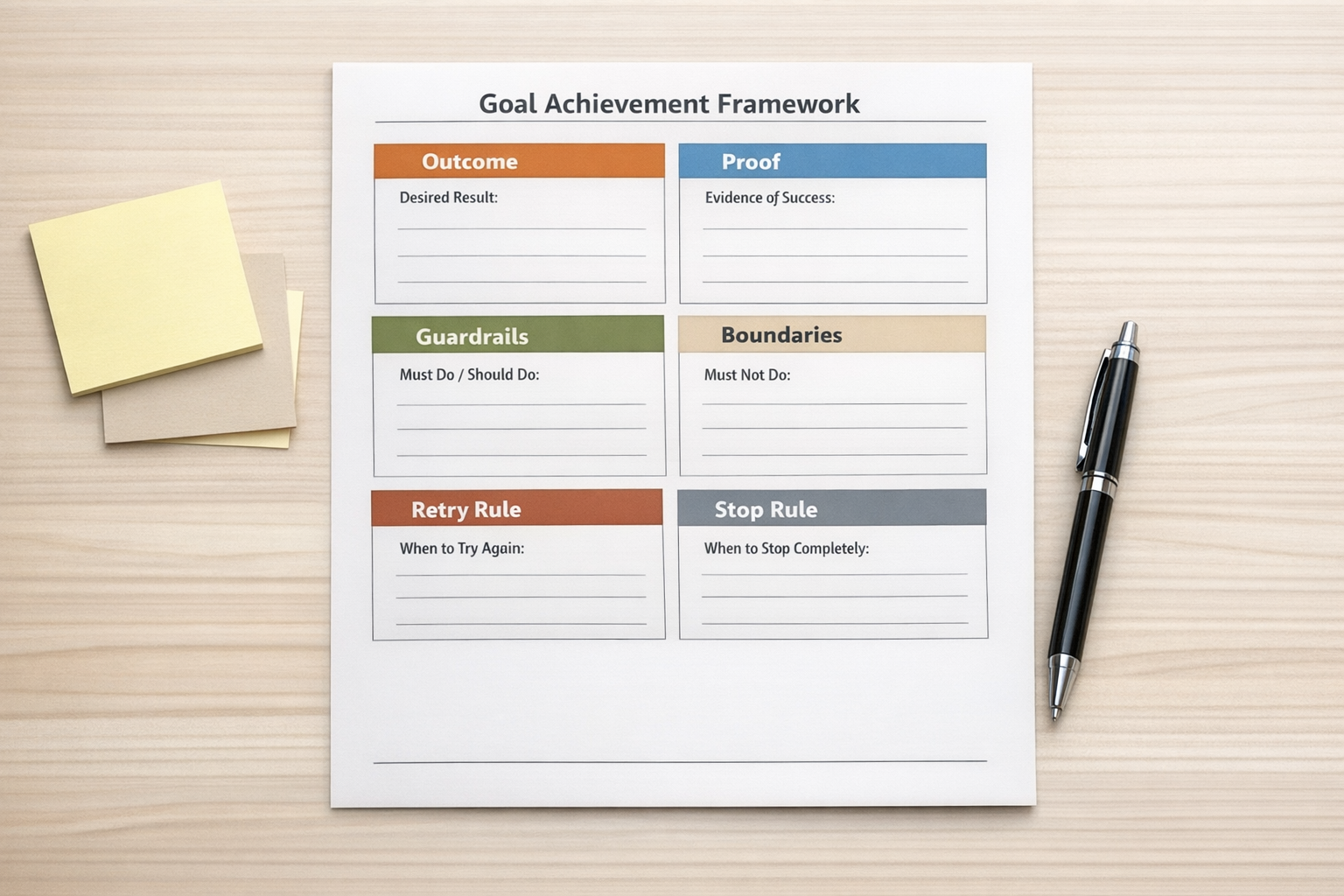
1. Outcome
The outcome is the end state in plain language. It should describe what will be true when the work is complete.
Weak outcome: “Clean up the CRM.”
Better outcome: “Review all new leads from this week, normalize company names where possible, flag likely duplicates, mark missing fields, and prepare a summary for sales review.”
The better version gives the agent a destination, not just an activity.
2. Proof
Proof is the evidence the agent must show before it can say the task is done. This is where many AI workflows fail.
“I checked everything” is not proof. A count of reviewed records, a list of skipped items, source links, changed fields, and unresolved blockers is much more useful.
For content repurposing, proof might include the number of source files found, the number of posts created, the output location, and a list of any files that could not be processed.
For support triage, proof might include ticket IDs reviewed, categories assigned, urgent items escalated, and messages that require a human response.
3. Guardrails
Guardrails define what must not break. This is especially important when AI touches operational systems.
For example, during CRM cleanup, the agent may be allowed to flag duplicates but not merge or delete records. During content editing, it may be allowed to improve structure but not add claims that were not in the source material. During project backlog review, it may be allowed to suggest owners but not reassign active work.
Guardrails reduce the risk of a technically completed task creating a new operational mess.
4. Boundaries
Boundaries explain what the agent can and cannot access, edit, or decide. This keeps the work contained.
A boundary might be: only review records created in the last seven days, only use the provided spreadsheet, only edit draft tasks in a specific ClickUp list, or only create proposed changes instead of applying them directly.
Good boundaries are not about limiting the usefulness of AI. They are about keeping the workflow safe enough to run repeatedly.
5. Next-move rule
The next-move rule tells the agent what to do when a check fails.
Without this, the agent may stop too early or make a bad assumption. A useful rule might be: if a company website cannot be found after checking the approved sources, mark it as not verified and move to the next record. Or: if a required field is missing, leave it blank, add a note, and include it in the final blocker list.
This prevents the agent from getting stuck or inventing an answer just to complete the form.
6. Stop rule
The stop rule defines when the agent should report back instead of continuing. This is important because not every issue should be solved by the agent.
For example, the agent should stop if it needs access it does not have, if two systems disagree in a way that affects customer data, if the task would require deleting records, or if the instructions conflict.
A good stop rule protects the business from silent errors.
Where this applies in real operations
This approach is useful anywhere the work is repeatable but still needs judgment. A few examples:
- CRM cleanup: standardize fields, flag duplicates, identify missing data, and prepare a review summary.
- Lead research: enrich records using approved sources and show what was verified.
- Content batching: turn approved source material into drafts while tracking every input and output.
- Support handoffs: categorize tickets, identify urgent issues, and prepare human-ready summaries.
- Project operations: review stale tasks, group related work, and surface blockers without changing ownership automatically.
- Sales follow-up: prepare call notes, next steps, and CRM updates for review before sending anything externally.

Process still comes before tools
It is tempting to look for the perfect AI agent platform first. But the real leverage usually comes from process clarity.
If the process is vague, the agent will produce vague work. If the process has a clear outcome, proof, guardrails, boundaries, retry logic, and a stop rule, the tool has a much better chance of being useful.
This is also where automation ROI becomes easier to understand. You are not just asking whether AI can generate output. You are asking whether it can remove a recurring block of manual checking, copying, sorting, reviewing, or reporting.
That is the difference between experimenting with AI and building an operational workflow.
A simple starting exercise
Pick one task your team repeats every week. Do not start with the biggest or riskiest workflow. Choose something useful but contained.
Then write answers to these six questions:
- What should be true when this task is finished?
- What evidence should be shown?
- What should the agent never change?
- What systems, files, records, or fields can it touch?
- What should it do when information is missing or a check fails?
- When should it stop and ask for human review?
If those answers are difficult to write, that is useful information. It means the workflow may need cleanup before it needs more automation.
At ConsultEvo, this is often where we start: define the process, validate the handoff, then build the automation or AI agent around it. That might involve ClickUp, Make, Zapier, HubSpot, GoHighLevel, Shopify, WordPress, or a custom AI workflow. But the principle stays the same.
Before you ask an agent to finish the work, define what finished means.
If you want help turning repeatable work into clear AI-assisted workflows, ConsultEvo can help you map the process, define the finish line, and build the system around it.