


Automating Weekly Reports Starts With Trust, Not Tools
Weekly reporting is one of the easiest places to spot operational waste. Someone exports data from a CRM, checks a spreadsheet, copies numbers into another sheet, updates a summary, sends it to leadership, then repeats the same process next week.
It is natural to look at that routine and say, “Let’s automate it.”
That is often the right instinct. But if the process is not trusted today, automation will not automatically make it trusted tomorrow. It may only move questionable data faster, format it better, and send it to more people.

The report is not the system
When a team asks for reporting automation, they usually describe the final output. A spreadsheet. A weekly email. A dashboard export. A leadership update. Those outputs matter, but they are only the visible end of the workflow.
The real system includes everything that happens before the report arrives:
- How the data enters the CRM or database
- Which fields are required and which are optional
- How duplicate, incomplete, or outdated records are handled
- Who reviews unusual values
- When the report should be sent, paused, or escalated
- What business decision the report is supposed to support
If those rules are unclear, the report becomes a ritual instead of an operating tool. People may still rebuild it manually because they do not fully trust the path from source data to final decision.
Start by defining what makes the report usable
A useful report does not need to be perfect. It needs to be clear enough, timely enough, and trusted enough to support action.
Before building the automation, define the standard for a usable report. For example:
- Freshness: How recent does the data need to be?
- Completeness: Which fields must be present?
- Ownership: Who fixes missing or incorrect data?
- Exceptions: What should block the report from being sent?
- Action: What should happen after the report is delivered?
This step often reveals the real issue. The reporting task may look repetitive, but the hidden problem might be unclear ownership, inconsistent CRM usage, or no defined exception path.
Use a simple validation canvas
You do not need a complex process document to design better reporting automation. A one-page canvas is usually enough to create alignment before the build starts.
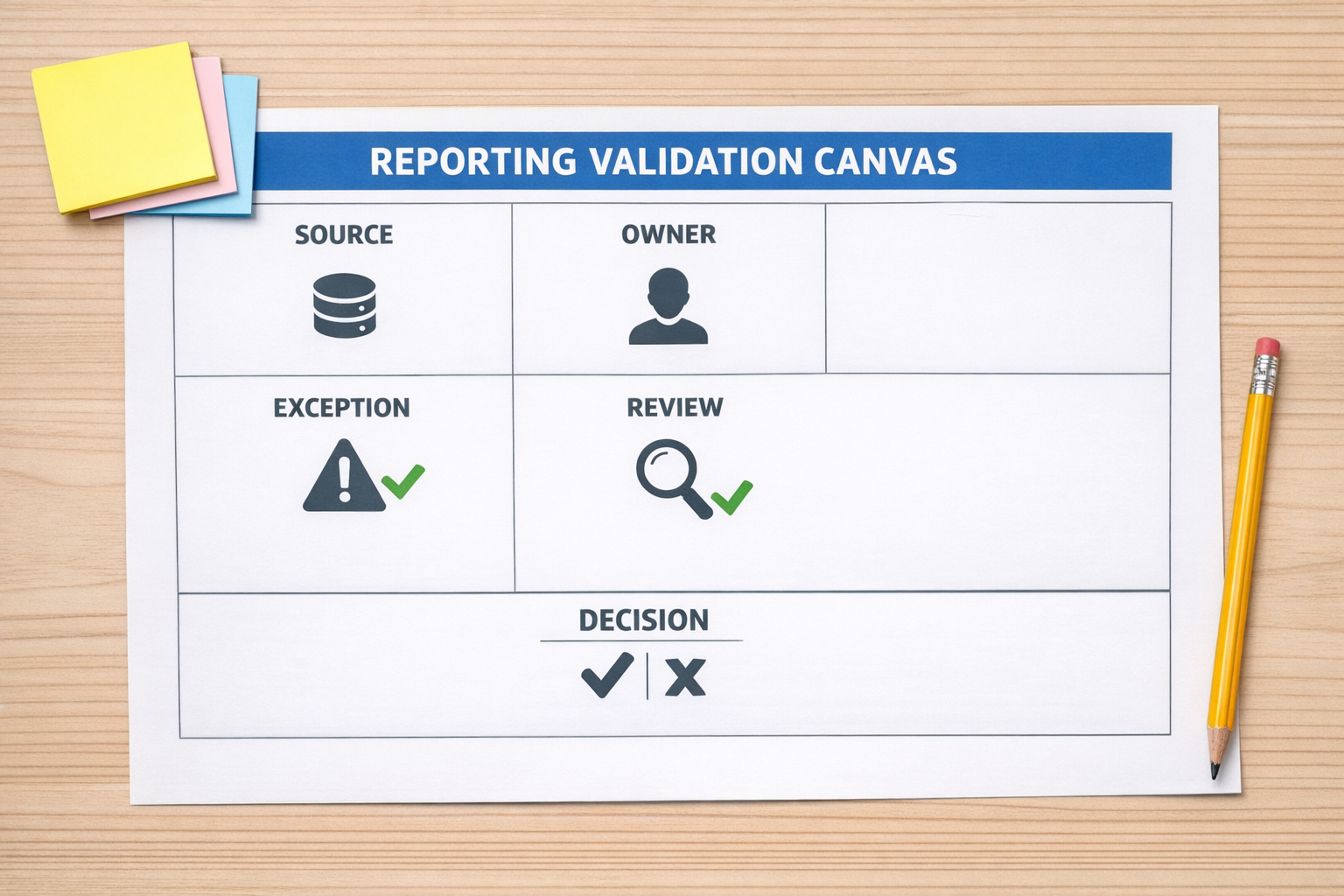
1. Source
Identify the source of truth. This could be a CRM, SQL database, Shopify store, support desk, form submission, or another operational system. Be specific. If the same data exists in several places, decide which system wins.
2. Owner
Every important data point needs an owner. If a deal stage is wrong, who corrects it? If revenue data does not match the CRM, who investigates? Automation needs ownership rules so exceptions do not become silent errors.
3. Exception
Define what should stop or flag the report. Missing required fields, duplicate records, empty sales owner values, stale opportunities, or incomplete order data are common examples. A good workflow does not pretend every record is fine.
4. Review
Some reports can be fully automated. Others need a short review step before sending. The goal is not to remove humans from every process. The goal is to remove unnecessary manual rebuilding and keep human attention where judgment is actually needed.
5. Decision
Every recurring report should have a purpose. If nobody changes a plan, follows up, coaches a rep, adjusts stock, or escalates an issue after reading it, the report may not need automation. It may need deletion or redesign.
Design the exception path before the happy path
Many automations are built around the ideal scenario: data is clean, fields are complete, timing is predictable, and every system behaves correctly. Real operations rarely work like that every day.
A stronger reporting workflow is designed around exceptions first. For example, if a weekly sales report depends on CRM stages, the automation should check for missing stage values before sending the summary. If a report depends on SQL data, the workflow should confirm that the expected data pull happened before updating the spreadsheet. If a manager needs to review outliers, the system should route only those records for review instead of forcing a full manual audit.

This is where tools like Make can be very effective. They can orchestrate data pulls, update spreadsheets, create tasks, send alerts, and route exceptions to the right person. But the tool should be implementing a clear operational rule, not compensating for an unclear process.
Where AI fits into reporting and coaching workflows
AI can add value when the workflow gives it structure. In a sales process, for example, AI can help summarize discovery calls, identify missing qualification details, draft coaching notes, or compare a call summary against a defined sales process.
But the same principle applies: AI needs criteria. If there is no agreed definition of a good discovery call, the AI assistant will produce output that still requires heavy interpretation. If the CRM fields are inconsistent, AI may spend too much effort explaining messy inputs instead of helping the team improve.
AI agents work best when they remove specific work from a validated process. They should not be used as a blanket layer over operational confusion.
A practical build sequence
If you want to automate a recurring report, use this sequence:
- Map the current manual process: Write down every export, copy-paste step, check, correction, and delivery point.
- Identify the decision: Clarify what the report is supposed to help someone do.
- Clean the source rules: Decide which fields matter and who owns them.
- Define exceptions: Choose what should pause, flag, or route the workflow.
- Build the first version: Automate the core repeatable path only after the rules are clear.
- Test with real data: Use actual messy records, not only perfect examples.
- Document the operating rule: Keep the workflow understandable for the person who will own it later.
The better question
Instead of asking, “Can this report be automated?” ask, “What would make this report trusted enough that we stop rebuilding it manually?”
That question changes the build. It shifts the focus from tool setup to operational confidence. It helps teams avoid automating noise. It also creates better workflows for reporting, sales coaching, CRM cleanup, support handoffs, Shopify operations, and internal dashboards.
If your team is rebuilding the same reports, checking the same records, or copying the same data between tools every week, ConsultEvo can help you validate the process and build the automation around how the business actually operates.