

Before You Build an AI Agent, Write Down the Decision Rules
AI tools are becoming very good at helping people create, research, compare, draft, summarize, and decide. That opens the door to useful business workflows, but it also creates a common trap: teams start with the tool instead of the process.
Someone sees an impressive AI demo and immediately thinks, “We should have an agent for that.” Lead qualification. Customer support. Product research. Proposal drafting. CRM updates. Content planning. Internal reporting. The list grows quickly.
There is nothing wrong with that instinct. Many of those workflows are good candidates for AI support. But the first question should not be, “Which AI tool can do this?” The first question should be, “How do we know what a good answer looks like?”
That question is where practical AI agents begin.
The hidden work behind a useful AI agent
In many businesses, important decisions are made through judgment that has never been written down. A founder knows whether a lead is worth pursuing. A support manager knows when a customer issue is urgent. An operations lead knows whether a request is ready for the next step. A sales person knows which details must be confirmed before a proposal goes out.
That judgment is valuable, but it is often invisible. It lives in Slack threads, inbox replies, quick calls, and the memory of experienced team members.
When you ask AI to help with that work without documenting the rules, the AI has to infer too much. Sometimes it will produce a useful answer. Sometimes it will miss context. Sometimes it will sound confident while skipping the detail that actually matters.
The issue is not always the model. Often, the issue is that the business has not defined the decision clearly enough.
Start with the reusable checklist
A simple reusable checklist is one of the most underrated steps in AI automation. It turns a fuzzy task into something that can be tested, improved, and eventually automated.
Before building an AI agent, write down the rules a good operator already follows. Keep it plain. You do not need a 40-page policy document. You need enough structure for the AI to understand the job and for a human to evaluate the result.
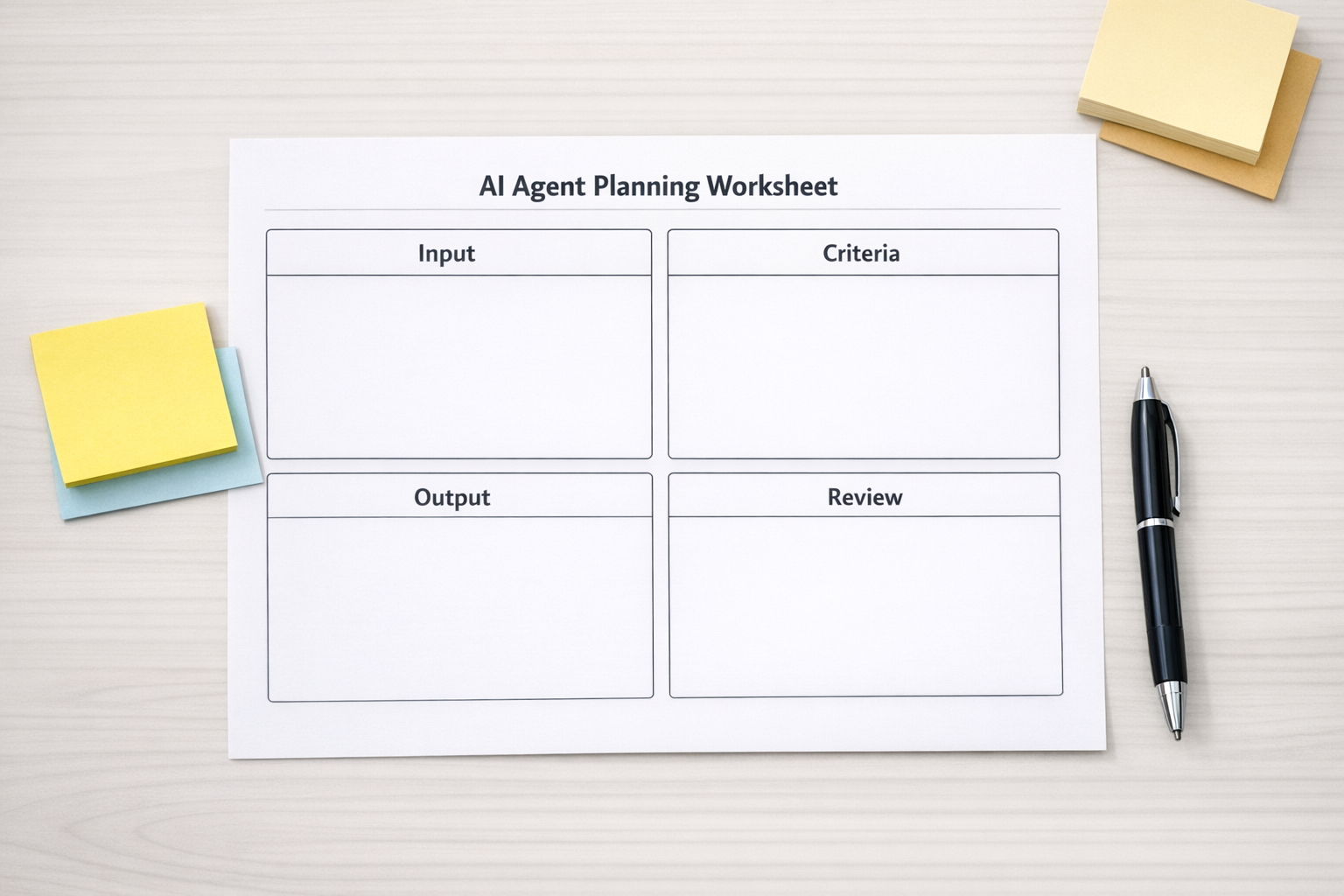
A practical AI agent worksheet should answer five questions:
- What information does the AI need? This could include a customer message, CRM fields, order history, project status, product requirements, or internal notes.
- What criteria should it apply? Define the rules it should check every time. For example: budget fit, urgency, missing details, quality standards, risk level, or customer segment.
- What should the output look like? Decide whether you want a summary, recommendation, score, draft reply, checklist, task update, or escalation note.
- When should a human review it? AI is useful, but not every workflow should run without review. Define exception cases clearly.
- What memory should be reused? This might include brand preferences, approved examples, customer policies, trusted vendors, tone guidelines, or internal definitions.
Once these rules exist, the automation becomes much easier to design. You are no longer asking AI to “handle support” or “help with sales.” You are asking it to perform a defined step inside a known process.
Example: AI-assisted support handoffs
Consider a support handoff workflow. A customer sends a message. The team wants AI to read it, summarize it, and route it to the right place.
At first, that sounds simple. But a useful handoff requires more than a summary. The agent may need to identify:
- The issue category
- The customer’s urgency
- Whether key information is missing
- Whether the request relates to billing, product, onboarding, or technical support
- Whether the account needs human attention
- The recommended next action
If those rules are not defined, the AI might create a neat summary while failing to route the issue correctly. That saves a few seconds of reading but does not improve the operation.
If the rules are defined, the agent can remove real work. It can prepare the handoff, flag exceptions, create a task, update the CRM, draft a response, or send the request to the right person with the right context.

The same pattern applies across the business
This approach works far beyond support. The strongest AI workflows usually start with a clear operational standard.
For lead qualification, define what makes a lead sales-ready. For CRM cleanup, define what a complete record looks like. For purchasing research, define the quality criteria before asking AI to compare options. For content validation, define the audience, angle, constraints, and approval rules. For project management, define when work moves from one status to another.
In each case, AI becomes more useful when it is not guessing the standard. It is applying the standard.
Process before tools is not a slogan
It is tempting to jump straight into building. Choose a model, connect a form, add a few prompts, send outputs into ClickUp, HubSpot, GoHighLevel, Slack, Make, or Zapier, and call it an agent.
Sometimes that works for a quick prototype. But for a workflow that a team depends on, unclear logic becomes expensive. Bad inputs create bad outputs. Missing review points create risk. Vague ownership creates confusion. Automation then becomes one more thing someone has to monitor and fix.
Process before tools means slowing down just enough to answer:
- Who owns this workflow?
- What triggers it?
- What decision is being made?
- What data is required?
- What should happen automatically?
- What should require approval?
- Where should the result be stored?
- How will we know if it worked?
These answers turn AI from a clever assistant into a dependable part of operations.
A simple way to begin
Pick one repeated task that creates friction but does not require full automation on day one. Then run this exercise:
- Collect five real examples of the task.
- Write down how an experienced person would handle each one.
- Identify the criteria they used to make decisions.
- Create a standard output format.
- Test an AI prompt against the five examples.
- Review where the AI was helpful and where it needed clearer rules.
- Only then connect it to your workflow tools.
This keeps the project grounded. You are not building around a demo. You are building around real work.
Where ConsultEvo helps
At ConsultEvo, we help teams turn messy manual workflows into clear systems, automations, and AI-assisted processes. A lot of our work happens before the final build: mapping the process, clarifying decision rules, cleaning up CRM fields, structuring ClickUp, and designing Make or Zapier workflows that match how the business actually operates.
The goal is not to add AI everywhere. The goal is to remove work where the process is clear enough, valuable enough, and safe enough to automate.
If you are considering an AI agent for sales, support, operations, CRM cleanup, project management, or internal admin, start with the decision rules. Once those are clear, the right tool choices become much easier.
And if you want help mapping, validating, or building that workflow, ConsultEvo can help you turn the idea into a practical operating system.