

AI Agent Workflows Need Scope Before Execution
As AI tools become better at running larger tasks, a new operational problem shows up: people start using heavier workflows before the work is clearly defined.
That matters for founders, operators, and teams building business automation. A larger AI agent workflow can split work across multiple steps, inspect different sources, and return one polished output. That can be genuinely useful. It can also create expensive confusion if the original request was vague.
The lesson is not to avoid AI agents. The lesson is to scope the work before the agent starts executing.
The bigger the workflow, the more important the brief
Small AI tasks usually stay close to the conversation. You ask for a rewrite, a summary, a critique, or a short plan. You can see the context and judge the result quickly.
Larger agent workflows are different. The work may be divided into phases. Different parts of the task may be handled separately. Intermediate findings may be merged into a final answer. That final answer can look clean, organized, and confident.
That polish is useful when the work was scoped well. It is risky when the tool had to guess the boundaries.
In business operations, this is the same issue we see with Make, Zapier, CRM workflows, ClickUp structures, and support handoff automations. A system will happily run the logic you give it. If the logic is unclear, the system does not become strategic. It becomes a faster way to spread the confusion.
Important does not always mean complex
One common mistake is treating importance and width as the same thing.
An investor email may be important, but it probably does not need a multi-agent workflow. A pricing note may carry real stakes, but the first output might simply be a decision packet with assumptions, risks, and open questions. A client response might matter a lot, but one focused review pass may be better than a large background process.
Bigger workflows are better suited to work that has real width. For example:
- Reviewing several folders, documents, or knowledge sources
- Auditing a CRM across pipelines, owners, lifecycle stages, and handoff points
- Comparing onboarding issues across tickets, checklists, manager notes, and customer feedback
- Preparing a client brief from account history, call notes, open tasks, and market context
- Researching a business idea across customer pain, alternatives, pricing, risk, and implementation effort
In each case, the work can be split into useful streams. Each stream can return evidence before the final output is merged.
If you cannot name the separate streams without hand-waving, the task probably needs more scoping before it needs more automation.
A simple scope check before running the workflow
Before asking an AI agent to run a larger task, use a short scope check. It does not need to be technical. It only needs to make the work visible.
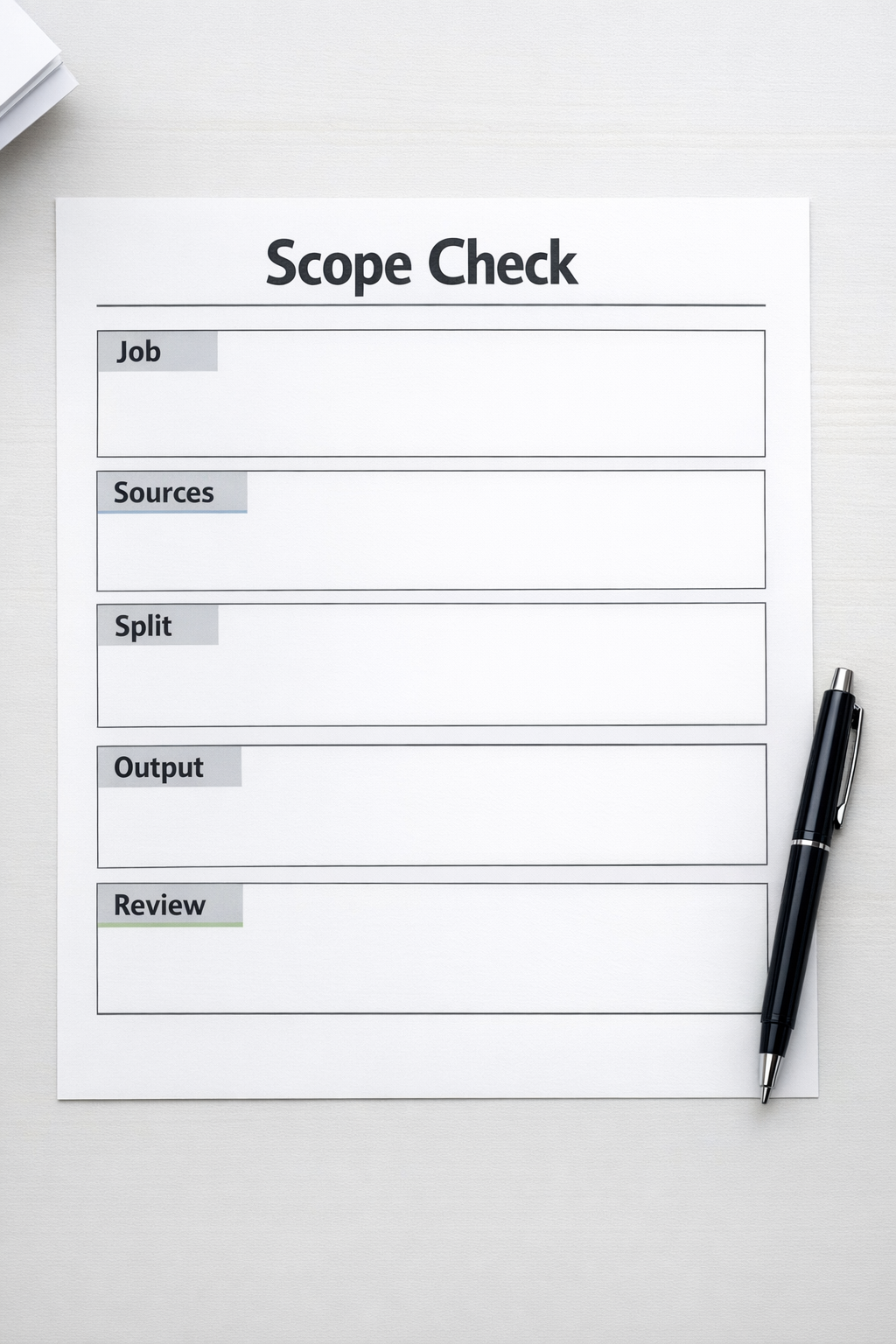
Define these five items:
- Job: Name the exact work that should happen. Avoid broad requests like “review this process” or “analyze this project.”
- Sources: List the files, links, tickets, CRM records, ClickUp tasks, notes, folders, or systems the agent may inspect.
- Split: Describe how the work should be divided. If the split is not obvious, ask the agent to propose a scope first instead of executing.
- Output: Define the final deliverable. This could be a memo, checklist, issue list, implementation plan, CRM cleanup recommendation, or decision packet.
- Review: Mark the point where a human checks the result before anything important happens.
This small checkpoint prevents a common failure: using automation to compensate for unclear instructions.
Ask for the scope before the execution
A useful beginner-safe prompt is simple:
“I may want to run this as a larger AI workflow, but do not start yet. Help me decide whether the task deserves a workflow. Return the exact job, whether the task is wide enough to split, the workstreams, source material for each workstream, output for each workstream, human review point, cheaper version using normal chat, and your recommendation.”
This forces the AI to explain the shape of the work before it begins producing the work. That is valuable because many automation problems start when planning and execution are blended together too early.
For serious work, create a run contract
If the workflow touches business-critical information, customer data, production systems, shared CRM records, or external communication, create a run contract.
A run contract is a plain-language agreement for the workflow. It should define:
- What the agent is allowed to inspect
- What the agent is not allowed to change
- What each workstream must return
- How evidence should be separated from interpretation
- Which claims need human review
- When the workflow should pause
For example, if an AI agent is reviewing a CRM cleanup plan, it may be allowed to inspect exported fields, pipeline definitions, duplicate examples, and lifecycle stage rules. It should not automatically edit records, merge contacts, send messages, or change automation rules without approval.
That boundary protects the business. It also improves the output because the agent has a clearer job.

How this applies to automation projects
At ConsultEvo, we use the same thinking when building AI agents, ClickUp systems, Make scenarios, Zapier automations, HubSpot workflows, GoHighLevel processes, Shopify operations, and support or sales handoffs.
The tool is rarely the first problem. The unclear process usually is.
Before building, we want to know:
- What work is currently manual?
- Where does copy-paste happen?
- Which decision points require human judgment?
- What data is trusted?
- What should happen when the workflow fails?
- Who reviews the output before it affects a customer or internal record?
Once those answers are clear, automation becomes much safer. The workflow has boundaries. The handoffs are visible. The review points are built in. The output can be checked against the original intent.
The practical rule
Use larger AI workflows when the work has real width, approved sources, clear workstreams, and a reviewable final output.
Use normal chat, a short prompt, or a single focused automation step when the task is narrow.
And when the task feels messy, do not start by asking the AI to execute. Ask it to help you scope the work first.
That one habit can save hours of cleanup, reduce false confidence, and make AI agents much more useful in real operations.
If you want help designing AI agent workflows, CRM cleanup systems, ClickUp structures, or Make and Zapier automations with the right scope and review points, ConsultEvo can help. We build practical systems that remove work without hiding the thinking.