


AI automation works best when you start with the work
The public conversation around AI often gets stuck on one dramatic question: will AI take jobs?
Inside a business, that question is too broad to be useful. A better operating question is: which parts of the work should no longer require a person?
That shift matters because a job is rarely one clean task. It is a bundle of smaller steps: intake, research, formatting, decisions, approvals, customer communication, follow-ups, reporting, and exceptions. AI may be very useful for some of those steps and risky for others.
When teams understand the difference, AI becomes a practical operations tool. When they do not, it becomes another layer of noise.

The mistake: automating a messy process
One of the most common automation mistakes is trying to add AI before the workflow is clear.
A team might say, “We need an AI agent to handle support requests,” or “We want AI to qualify leads.” Those can be good ideas. But the next questions usually reveal the real issue:
- Where does the request enter the system?
- What information is required before work can begin?
- Who owns the next step?
- What counts as a good response?
- When should a human review the output?
- Where should the final result be recorded?
If those answers are unclear, AI will not fix the process. It may speed up parts of it, but it will also create cleanup work. People will spend time checking outputs, correcting records, chasing missing details, and deciding what the automation should have done.
That is not real efficiency. It is work being moved from one place to another.
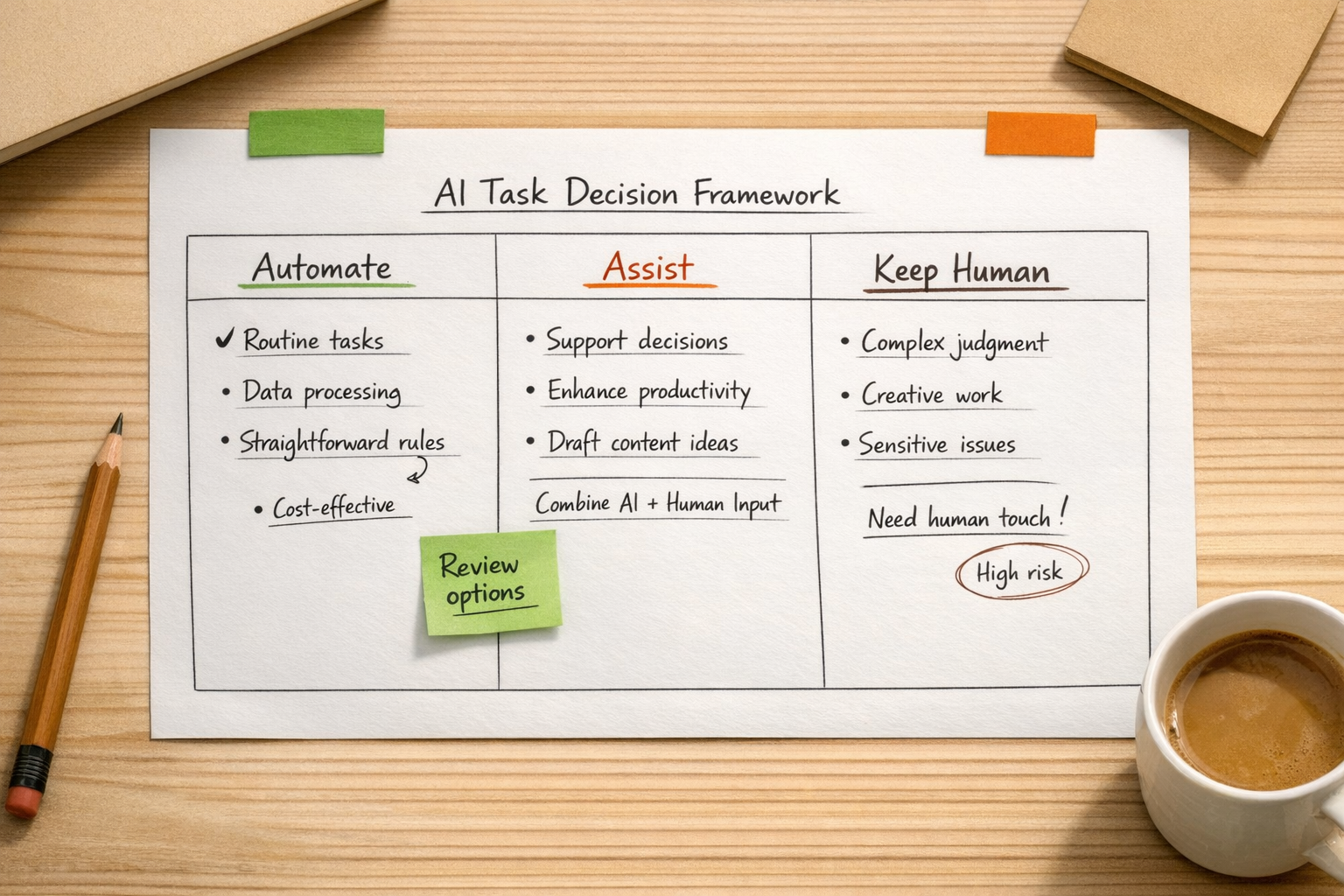
Start by separating the work into three categories
Before choosing a tool or building an agent, review the workflow and sort tasks into three groups.
1. Repeatable work
This is work that follows a predictable pattern. Examples include formatting information, routing a form submission, creating a task from a sales call, sending a standard follow-up, updating a CRM property, or summarizing a ticket.
This is usually the best place to start with automation because the risk is lower and the time savings are easier to see.
2. Decision support work
This is where AI can assist, but should not fully own the outcome. Examples include drafting a proposal, suggesting a lead score, preparing a support reply, reviewing a customer message, or summarizing options for an internal decision.
The AI helps reduce preparation time, but a person still applies judgment.
3. Human judgment work
This is work that involves nuance, trade-offs, customer sensitivity, negotiation, leadership, or accountability. These steps may still benefit from AI support, but they should not be hidden inside a black box.
For many businesses, the goal is not to remove humans from the workflow. The goal is to remove the repetitive drag around the human work.
The question every AI workflow needs
When designing an AI-assisted workflow, ask this question:
If AI handles this step, who checks the result, where does it go next, and what happens when confidence is low?
This one question prevents a lot of operational pain.
It forces the team to define ownership. It makes the handoff visible. It creates a fallback path for edge cases. It also makes quality control part of the design instead of an afterthought.
For example, if an AI agent summarizes sales calls and updates CRM notes, the workflow should define:
- Which calls are eligible for summarization
- What fields should be updated
- Which fields require human approval
- How errors are flagged
- Who reviews low-confidence summaries
- How the sales team gives feedback on quality
Without those rules, the automation may look impressive for a week and then slowly lose trust.
Good AI automation reduces pressure
AI adoption should not simply mean asking the same team to do more with the same confusion. The better use is to reduce the operational pressure that builds up around manual systems.
That might mean fewer copy-paste updates between tools. Faster routing from sales to delivery. Cleaner CRM records. Better support handoffs. More consistent task creation in ClickUp. Less time spent rewriting the same customer message. Fewer leads sitting untouched because no one knew who owned the next step.
These are not dramatic use cases, but they are often the ones that make the biggest day-to-day difference.

A practical implementation path
If you are considering AI agents or workflow automation, use a simple implementation path:
- Map the current workflow: document how work actually moves today, not how it is supposed to move.
- Find the repeated steps: look for recurring updates, messages, summaries, checks, and handoffs.
- Define the decision points: separate simple routing logic from judgment-heavy decisions.
- Choose one narrow workflow: start with a contained process where success is easy to observe.
- Build review into the system: decide what humans approve, what AI can complete, and what gets escalated.
- Measure operational impact: look at time saved, fewer errors, faster handoffs, cleaner records, or reduced backlog.
This approach works whether the system is built in Make, Zapier, HubSpot, GoHighLevel, ClickUp, Shopify, WordPress, or a custom AI agent setup. The tool matters, but the workflow matters first.
The real goal: better work design
AI will remove some tasks. It will create new ones. It will change how roles are assembled. But businesses do not need to solve the entire future of work before making better operational decisions today.
The practical opportunity is to design work more clearly.
Remove the repetitive parts where machines are useful. Keep people close to judgment, relationships, and accountability. Make handoffs visible. Build validation into the system. Do not automate confusion and call it progress.
If your team is exploring AI agents, CRM workflows, ClickUp systems, Make, Zapier, HubSpot, GoHighLevel, Shopify operations, or support and sales handoffs, ConsultEvo can help you find the right starting point and build automation that removes real work instead of creating new cleanup.