


AI makes output cheap. That does not make operations simpler.
AI has changed the economics of first drafts. A team can now generate rough sales emails, support replies, project summaries, campaign ideas, research notes, meeting recaps, and process outlines much faster than before.
That is useful. It also creates a less obvious problem for operators: the amount of work produced can grow faster than the team’s ability to review, route, approve, and use it.
When production gets easier, judgment becomes the bottleneck.

This is where many AI and automation projects get messy. The team starts with the tool. They ask what the AI can create, what the automation can trigger, or which app can connect to which system.
Those questions matter, but they come too early. Before deciding what to automate, you need to define what good work looks like, where human review belongs, and what should happen after the AI creates something.
The bottleneck has moved from production to decision-making
For years, many business workflows were slowed down by production effort. Someone had to write the first version. Someone had to summarize the notes. Someone had to copy data from one system to another. Someone had to prepare the client update or build the task list.
AI reduces part of that effort. But once the first version is easy to create, the team still has to answer harder operational questions:
- Is this output accurate enough to use?
- Does it match our customer context?
- Does it need approval before being sent?
- Which CRM record, project, or task should it attach to?
- Who owns the next step?
- What happens if the output is incomplete or risky?
If these questions are unanswered, AI does not remove work. It creates a pile of drafts, suggestions, and half-finished outputs that humans still need to sort through.
This is why process comes before tools. A prompt can generate a result, but a workflow decides whether that result is useful.
Start with the repeated work, not the AI feature
A practical AI workflow starts with a simple observation: what does the team keep doing over and over?
Examples might include:
- Turning sales calls into follow-up emails
- Summarizing support tickets for escalation
- Creating project tasks from client requests
- Drafting product descriptions from supplier information
- Preparing weekly internal updates
- Cleaning CRM notes after meetings
Once you identify the repeated task, document the current steps. Do not skip the messy parts. Include where information comes from, who checks it, which system receives the output, and where mistakes usually happen.
This gives you the real workflow. Without it, automation design becomes guesswork.
Use a validation sheet before building the automation
Before connecting apps or building an AI agent, use a small validation worksheet. This keeps the project grounded in operational reality.
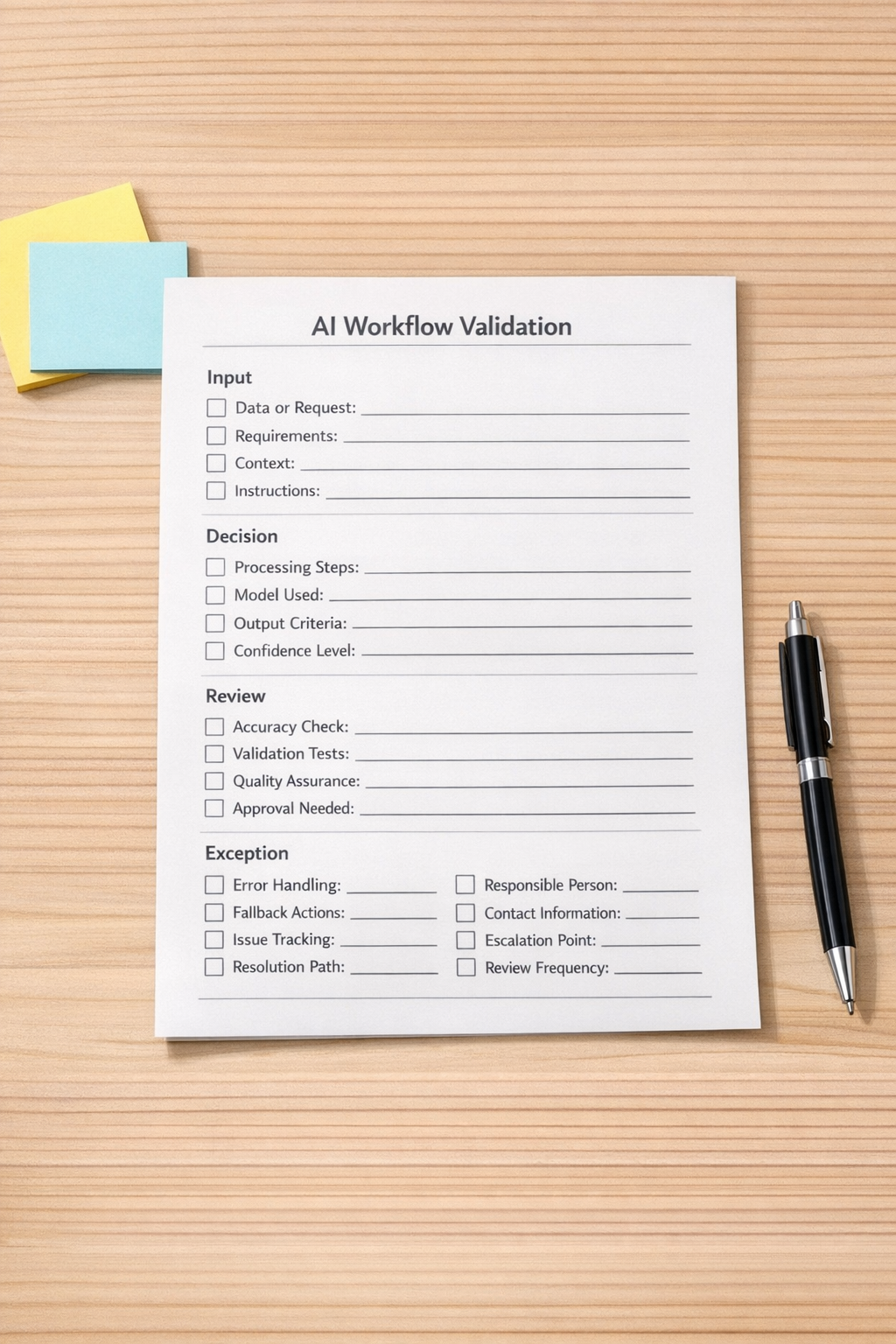
1. Define the task
Be specific. “Help with sales” is too broad. “Draft a follow-up email after a discovery call using call notes, deal stage, and buyer role” is much better.
2. Define the input context
AI needs useful context. That may include customer type, deal stage, recent conversation notes, tone rules, product limitations, service boundaries, or internal approval requirements.
If the context is missing, the output will often sound polished but be operationally weak.
3. Define the quality standard
What makes the output acceptable? This is where human judgment needs to become visible. Include examples of good outputs, bad outputs, required fields, banned claims, tone preferences, and common mistakes.
4. Define the review rule
Not every AI output should be treated the same way. Some can be saved as a draft. Some can be sent to a task owner. Some must be reviewed by a manager. Some should never be generated without human approval.
A simple rule might be: low-risk internal summaries can move automatically, but customer-facing messages above a certain deal value require review.
5. Define the destination
Where does the output go? A CRM note, a ClickUp task, a Slack message, an email draft, a Google Doc, a HubSpot record, a GoHighLevel opportunity, or a support ticket?
This matters because many teams lose time after generation. The AI creates something, then a human copies it, edits it, pastes it somewhere else, updates a field, assigns a task, and sends a reminder. That handoff is often where automation ROI lives.
Turn team judgment into reusable context
One of the most valuable things a business can do is document the judgment that already exists inside the team.
That judgment may include:
- How your best salesperson frames objections
- What your support lead considers a risky reply
- Which client requests require escalation
- How your operations manager names tasks
- What your founder never wants promised in writing
- Which CRM fields must be completed before a handoff
If that knowledge stays in people’s heads, AI cannot use it consistently. If it becomes reusable context, the AI-assisted workflow becomes much more reliable.
This does not need to be complicated. Start with a small folder or internal knowledge base containing:
- Examples we like
- Examples we do not like
- Customer tone guidelines
- Approval rules
- Escalation rules
- Workflow steps
- Required fields by process
The goal is not to create a huge documentation project. The goal is to make the team’s standards usable by both people and systems.
Design the handoff carefully
The handoff is where many AI workflows either become useful or become noise.
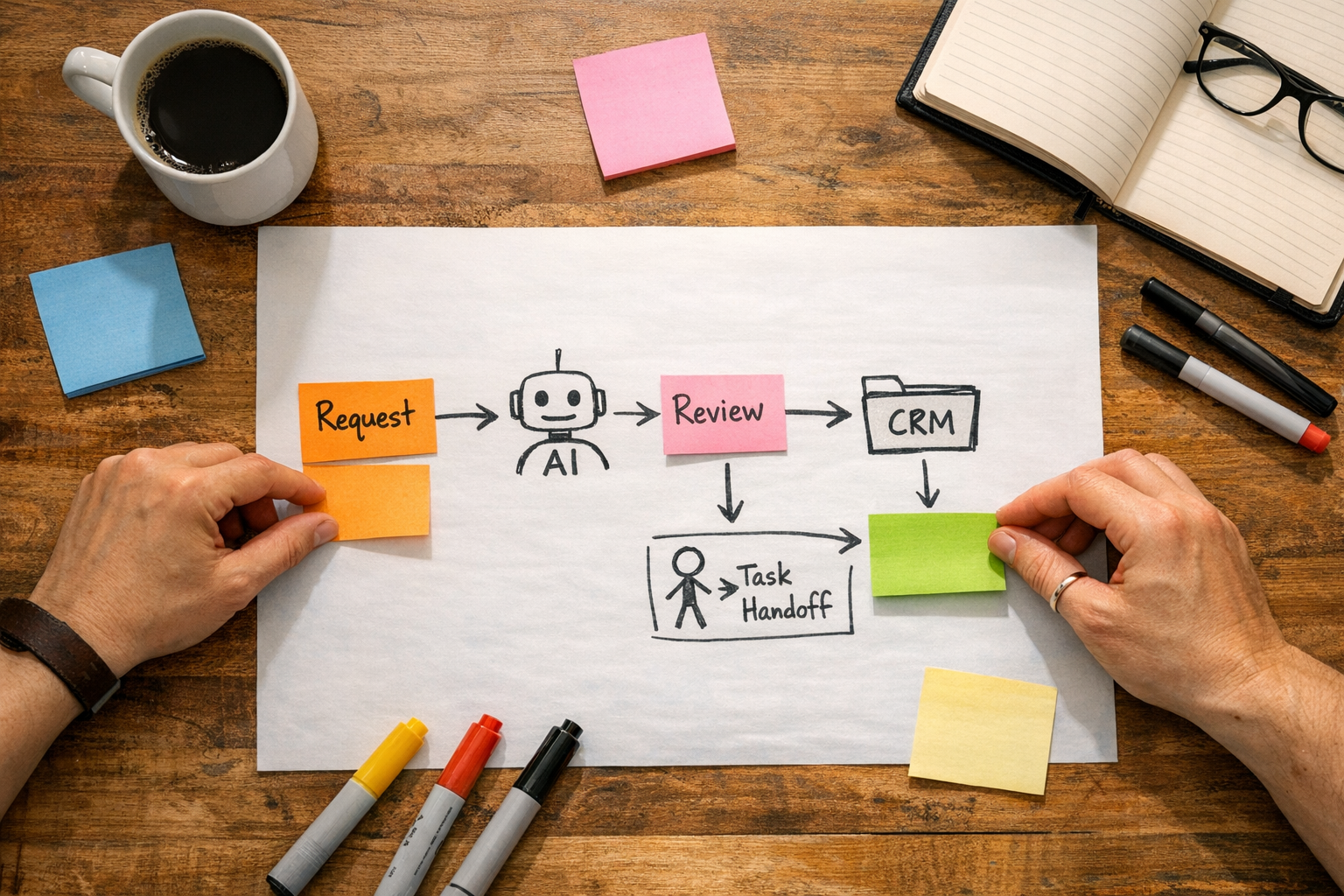
Imagine an AI-assisted sales follow-up process. The draft itself is only one part of the workflow. The system may also need to:
- Find the correct contact and deal
- Read the latest notes
- Respect the current pipeline stage
- Create the email as a draft, not send it automatically
- Assign a review task to the account owner
- Update the next follow-up date
- Log the activity in the CRM
That is the difference between an AI trick and an operational system.
The same applies to support, fulfillment, project management, ecommerce operations, and internal reporting. The output is useful only if it lands in the right place, with the right context, for the right person, at the right time.
What should stay human?
A good AI workflow does not remove human judgment from important decisions. It protects it.
Humans should usually stay involved when the work involves customer trust, legal or financial risk, sensitive data, unusual edge cases, brand-sensitive communication, or decisions that affect a relationship.
AI can prepare, summarize, draft, classify, route, and suggest. But the business still needs clear ownership for the final decision.
This is especially important for small teams. Automation should reduce manual copy-paste and repeated admin work, not create a system nobody feels responsible for.
A simple implementation plan
If you want to make AI useful in your operations, start with one workflow. Do not try to redesign the whole company at once.
- Pick one repeated task that happens every week.
- Write down the current steps, including the manual copy-paste.
- Identify the judgment points where someone decides what is good, risky, or ready.
- Create reusable context such as examples, rules, and required fields.
- Define the handoff into your CRM, ClickUp, inbox, support desk, or project system.
- Build a small version before adding more branches and exceptions.
- Review the workflow after real use and improve the rules.
This approach is slower than chasing every new AI feature. It is also safer and more likely to produce real operational value.
The real advantage is operational clarity
AI makes it easier to create more work. Operational clarity makes it easier to use the right work.
The teams that benefit most will not be the ones with the longest prompt library. They will be the ones that know their processes, document their judgment, and design clean handoffs between people, AI, and business systems.
If you want help turning repeated work into practical AI-assisted workflows, ConsultEvo can help you map the process, validate the automation, and build systems across tools like ClickUp, Make, Zapier, HubSpot, GoHighLevel, Shopify, WordPress, and CRM platforms.
Start with the process. Then let the tools do the work they are actually suited for.