


Build AI agents around repeatable work, not random prompts

AI has made it easier for a founder, consultant, or small team to get more done without immediately hiring for every function. That part is real. But the practical value does not come from having a folder full of clever prompts.
The value comes from turning repeated work into repeatable systems.
A one-off prompt can help with a proposal, a sales email, a content outline, a client summary, or a support reply. It saves a few minutes in the moment. But if you have to remember the prompt, paste the same context, explain the same rules, and clean up the same output every time, you have not really removed the work. You have just changed the shape of it.
This is where many AI projects stall. The tool is capable, but the process is vague. The business still depends on someone manually deciding what to do, where to get the context, how to format the result, and who receives it next.
The better question: what work keeps repeating?
Before building an AI agent, it helps to stop asking, “What can AI do?” and start asking, “What do we keep doing again and again?”
That question usually points to better automation opportunities. Repeated work has patterns. Patterns can be documented. Documented patterns can be turned into workflows, agent instructions, CRM actions, ClickUp tasks, Make scenarios, Zapier automations, or a combination of these.
For example, a solo consultant might repeat these tasks every week:
- Reviewing inbound leads and deciding who is a fit
- Preparing discovery call notes
- Turning call transcripts into follow-up emails
- Creating onboarding tasks after a client signs
- Summarizing project status for clients
- Checking whether deliverables meet internal standards
- Reusing answers to common support or client questions
Each task might look small. Together, they create a large amount of hidden operational drag.
An agent skill starts as a process definition
A useful AI agent skill is not just a prompt. It is a packaged way to handle a specific job consistently. It has instructions, context, rules, templates, and a clear output.
In practical terms, you want to define five things before you build:
- Trigger: What starts the task?
- Inputs: What information does the agent need?
- Decision rules: What should the agent check, compare, or classify?
- Output: What should the agent produce?
- Handoff: Where does the result go next?
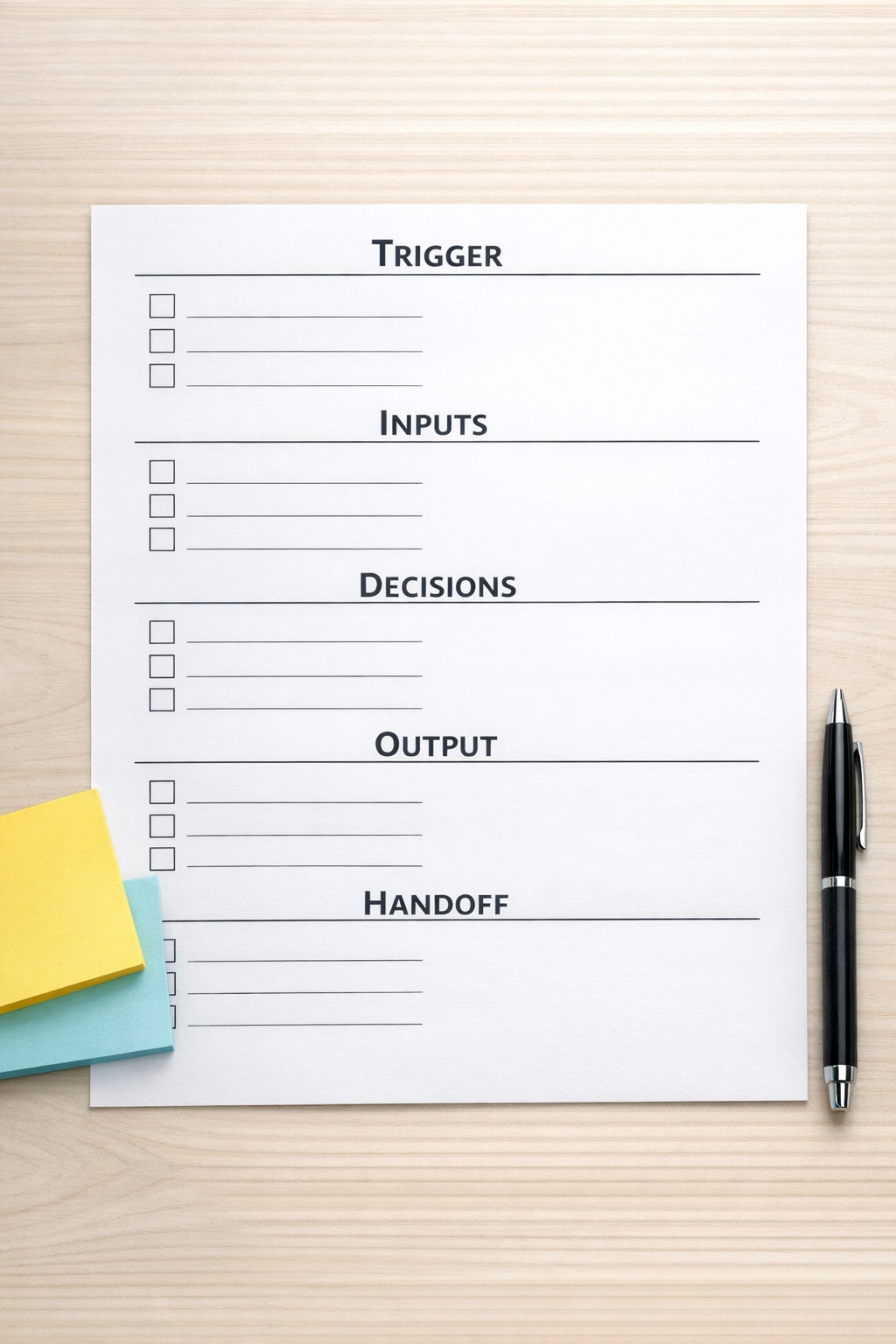
This definition matters because it separates a helpful AI interaction from an operational workflow. Without it, the output may be impressive but disconnected from the rest of the business.
A simple example: lead qualification
Lead qualification is a good example because it often includes repeated judgment. A business receives an inquiry, reviews the message, checks the service fit, looks for budget or urgency signals, and decides what should happen next.
If this happens manually every time, it can become inconsistent. One lead gets a thoughtful reply. Another sits in the inbox. Another gets added to the CRM with missing fields. Another gets booked even though the fit is weak.
An AI-assisted lead qualification workflow could be designed like this:
- Trigger: A new form submission arrives.
- Inputs: Form answers, service page source, CRM history, and required qualification criteria.
- Decision rules: Categorize the lead as strong fit, possible fit, poor fit, or needs review.
- Output: Create an internal summary, recommended next action, and draft response.
- Handoff: Update the CRM, notify the owner, or create a follow-up task.
Notice that the agent is not replacing business judgment entirely. It is preparing the work so the human can make a faster, clearer decision.
Do not automate confusion
One of the biggest mistakes in AI automation is building too early. If the current process is unclear, the automation will usually make the confusion faster.
Before adding AI, ask a few uncomfortable but useful questions:
- Do we know what a good output looks like?
- Do we have examples of good and bad results?
- Does the task follow rules, judgment, or both?
- Who reviews the output before it reaches a client?
- What should happen when the agent is uncertain?
That last question is important. Good workflows include exception handling. Not every lead, task, ticket, or request should move automatically. Some should be flagged for review.
Where tools fit into the picture
Once the workflow is clear, the tool decision becomes much easier.
If the work is task-based, ClickUp may be the right place to structure the process. If the workflow connects multiple apps, Make or Zapier may be the right automation layer. If the process is sales or marketing related, HubSpot or GoHighLevel may be where the CRM logic lives. If the work is ecommerce operations, Shopify events may become the trigger.
The important point is that tools should support the workflow. They should not define it too early.
Start with one recurring task
If you want to build useful AI agents, do not start by trying to redesign the entire business. Start with one recurring task that has a clear beginning and end.
Choose something that:
- Happens at least weekly
- Uses similar inputs each time
- Requires repeated decisions or formatting
- Creates delays, copy-paste, or missed context
- Can be reviewed safely before going fully live
Then document the process manually. Run it a few times. Improve the instructions. Only then should you connect it to automation.
This approach is slower at the beginning, but it prevents brittle workflows and messy handoffs later.
The goal is operational clarity
AI agents are most useful when they remove work from a real process. They should reduce repeated thinking, manual copying, status chasing, and inconsistent handoffs.
That is not about replacing every person or automating every decision. It is about giving the business a cleaner way to handle work that already repeats.
At ConsultEvo, this is how we approach AI and automation projects: process first, workflow validation second, tools third. If the workflow is clear, the build becomes simpler. If the workflow is unclear, even the best tool stack will struggle.
If you want help turning repeated manual work into AI-assisted operations, ConsultEvo can help you map the process, validate the workflow, and build it inside the tools your business already uses.