

Validate the Workflow Before You Build the Automation
There is a quiet trap in automation work: building too soon.
A founder has a new offer idea and asks AI to write the landing page. A sales team wants a CRM workflow before agreeing on lead stages. An operations manager wants a Make or Zapier automation before checking whether the manual process is even consistent. A team wants an AI agent before documenting what the agent should decide, escalate, or ignore.
The intention is usually good. People want to move faster. They want less manual work. They want clearer handoffs. But if the workflow has not been validated, automation can make the mess move faster too.
Start with evidence, not tooling
Before choosing the tool, ask a simpler question:
Where is this problem already showing up?
For a new business idea, evidence might come from public conversations, customer reviews, support threads, sales calls, or repeated questions in communities. You are looking for people describing the pain in their own words.
For an internal workflow, evidence might look different. It could be duplicate data entry, repeated Slack reminders, overdue tasks, messy CRM properties, missed handoffs between sales and support, or spreadsheet updates that everyone knows are fragile.
The point is not to collect endless research. The point is to prove that the problem is real enough, frequent enough, and costly enough to deserve a system.
AI is useful for sorting the mess
AI can be very helpful at this stage, but not because it magically knows your business. It helps because it can organize unstructured information quickly.
You can use AI to review anonymized notes, call summaries, task comments, ticket themes, or customer language and ask for patterns. It can group similar problems, identify repeated phrases, and separate urgent issues from vague complaints.
That creates a better starting point for an operator. Instead of staring at scattered inputs, you can review a structured list of possible workflow problems.
Still, the decision should remain human. AI can help you see the signals. It should not decide what your team builds next.
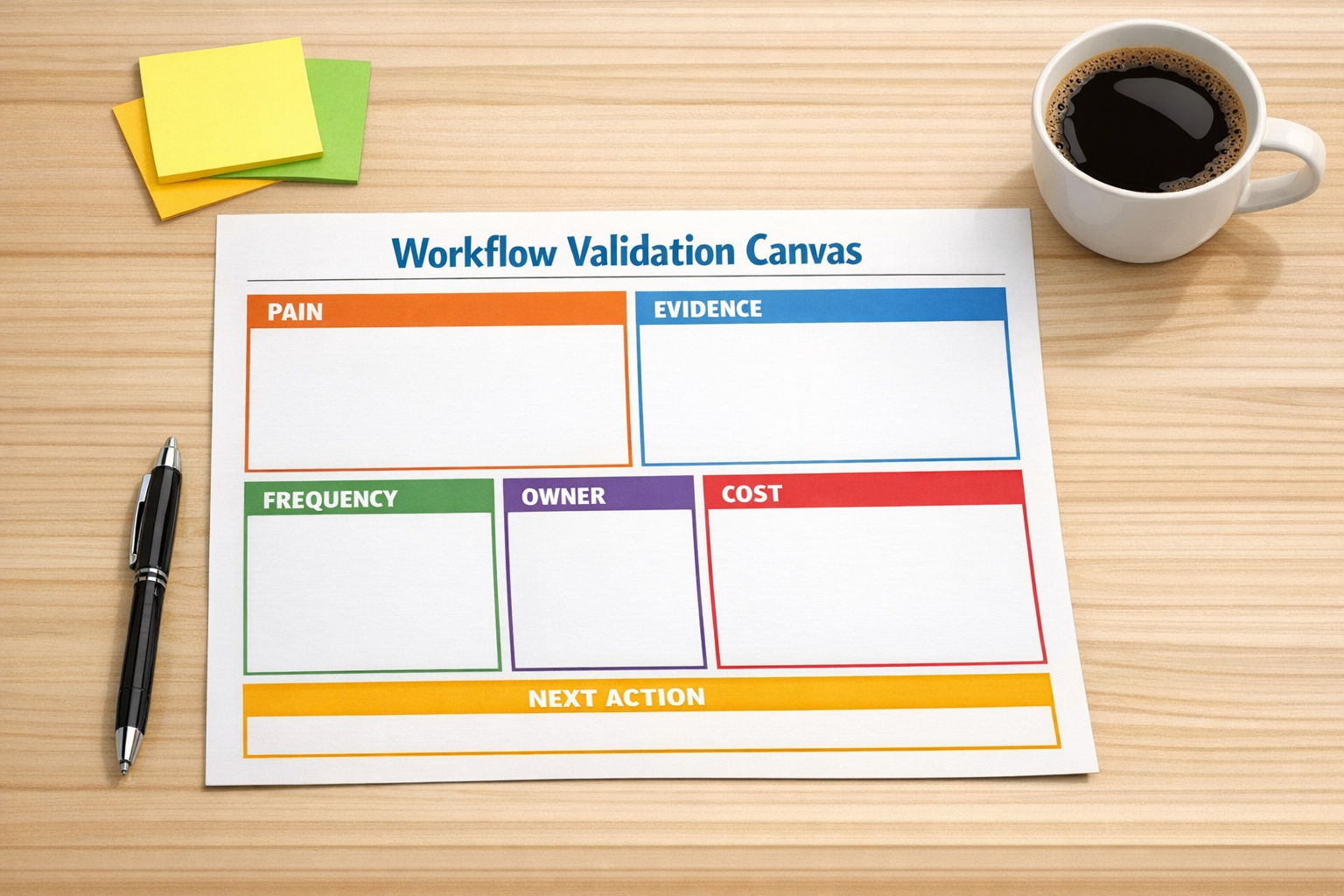
A practical workflow validation canvas
At ConsultEvo, we like to bring automation ideas back to a simple validation page before building. It does not need to be fancy. It just needs to make the decision visible.
Use these sections:
- Problem: What manual work, delay, confusion, or customer pain are we trying to solve?
- Evidence: Where have we seen this happen? Include examples, not opinions.
- Frequency: Does this happen daily, weekly, monthly, or only once in a while?
- Owner: Who owns the outcome today, and who feels the pain when it breaks?
- Cost: Does it waste time, create risk, delay revenue, hurt customer experience, or create reporting problems?
- Decision: Should we automate it, simplify it, document it, delegate it, or leave it alone?
This small step prevents a lot of unnecessary building. Some problems do not need automation. They need clearer ownership. Some need a better intake form. Some need CRM cleanup. Some need a standard operating procedure. Some should be removed from the process entirely.
What validation looks like in real operations
Imagine a sales-to-operations handoff that keeps causing confusion. The first instinct might be to create an automation that sends a message when a deal closes.
But validation may reveal a different issue. Maybe the deal stage is not reliable. Maybe required fields are often blank. Maybe the sales team uses notes inconsistently. Maybe operations does not need more notifications, but better structured intake data.
If you automate the notification first, you have only made the weak handoff louder. If you validate the workflow first, you might decide to clean the CRM fields, tighten the close-won process, and then automate the handoff once the inputs are trustworthy.
This is the difference between tool-first automation and process-first automation.

Use AI agents after the rules are clear
The same principle applies to AI agents. An agent can remove real work when the job is clear. It needs defined inputs, boundaries, escalation rules, and success criteria.
For example, an AI agent that reviews inbound leads should know what information matters, what counts as a qualified lead, when to update the CRM, when to ask for missing information, and when to alert a human. Without those rules, the agent becomes another unpredictable layer in the process.
Before building the agent, validate the workflow. Look at recent examples. Identify the repeated decisions. Decide what can be handled safely and what should stay with a person. Then build the smallest useful version.
A simple implementation sequence
If you are considering a new automation, use this sequence:
- Collect examples: Gather real cases from the last few weeks or months.
- Group the patterns: Use AI to help cluster similar issues, but review the output carefully.
- Define the workflow: Map the current path from trigger to outcome.
- Remove waste first: Delete steps, fields, notifications, or approvals that do not help.
- Set the rules: Decide what should happen automatically and what needs human review.
- Build small: Start with one workflow, one trigger, and one measurable operational outcome.
- Review after launch: Check edge cases, failed runs, team feedback, and data quality.
This approach is slower for the first hour and faster for the next six months. It creates automations that are easier to maintain because they are attached to real operational evidence.
The best automations remove proven work
Automation ROI does not come from connecting tools for the sake of it. It comes from removing repeated work, reducing avoidable errors, improving handoffs, and giving the team a cleaner way to operate.
That starts before the build. It starts with validating the pain, the workflow, and the decision rules.
If your team is thinking about an AI agent, CRM cleanup, ClickUp structure, Make scenario, Zapier workflow, HubSpot process, GoHighLevel setup, or support handoff, pause before building. Ask where the problem is already visible. Gather the examples. Let AI help organize the evidence. Then decide what deserves automation.
Need a second set of eyes? ConsultEvo helps teams validate, design, and build practical automation systems that remove real work without adding unnecessary complexity.